

iKhedut 2.0 માં આધાર e-KYC વેરીફિકેશન કેવી રીતે કરવું? (Step-by-Step Guide)
How to Complete Aadhaar e-KYC Verification in iKhedut 2.0 Portal – Full Guide, iKhedut 2.0 માં આધાર e-KYC વેરીફિકેશન કેવી રીતે કરવું? સંપૂર્ણ માર્ગદર્શિકા
લેખક: KrushiPragati.in
પ્રકાશન તારીખ: 27 માર્ચ 2026
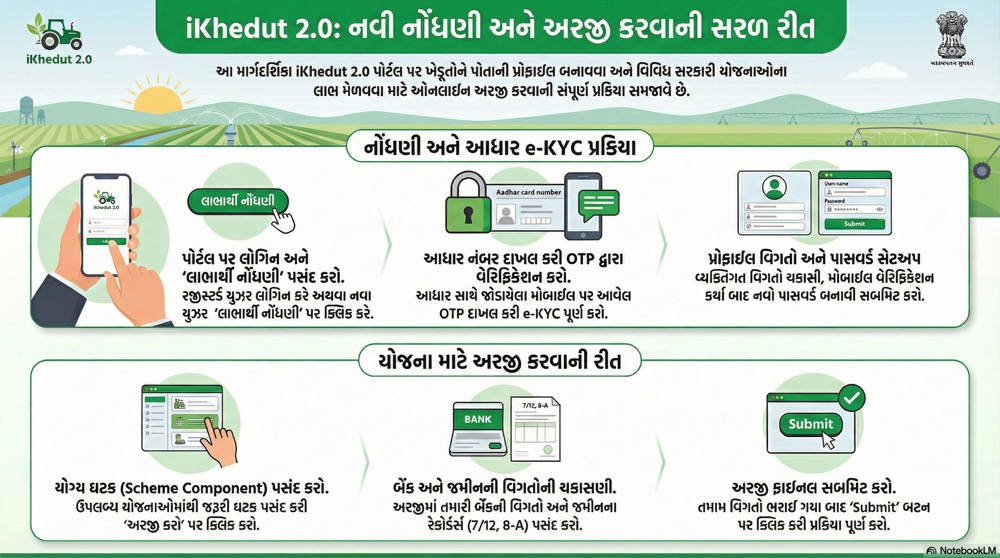
iKhedut 2.0 શું છે?
iKhedut 2.0 ગુજરાત સરકારનું એક અધિકૃત કૃષિ પોર્ટલ છે, જ્યાં ખેડૂતો વિવિધ સબસિડી અને સહાય યોજનાઓ માટે ઓનલાઈન અરજી કરી શકે છે.
આ પોર્ટલ દ્વારા ખેડૂતો નીચેની સહાય મેળવી શકે છે:
- બીજ સબસિડી
- સિંચાઈ સાધનો સહાય
- ખેતી મશીનરી સહાય
- વીજળી અને પાણી સંબંધિત યોજનાઓ
- અન્ય કૃષિ સહાય યોજનાઓ
આધાર e-KYC શું છે?
e-KYC (Electronic Know Your Customer) એ એક ઓનલાઇન પ્રક્રિયા છે, જેમાં આધાર નંબર દ્વારા તમારી ઓળખ ચકાસવામાં આવે છે.
iKhedut 2.0 માં e-KYC કરતી વખતે નીચેની માહિતી ચકાસાય છે:
- આધાર મુજબ નામ
- જન્મ તારીખ
- લિંગ
- સરનામું
- મોબાઇલ નંબર
આ પ્રક્રિયા 100% ફ્રી છે.
iKhedut 2.0 માં e-KYC શા માટે જરૂરી છે?
e-KYC ફરજિયાત રાખવાનું મુખ્ય કારણ:
 સાચા ખેડૂતને જ લાભ મળે
નકલી અરજીઓ અટકે
અરજી ઝડપથી મંજૂર થાય
સરકારની સહાય સીધી મળે
i-Khedut 2.0 Login કેવી રીતે કરવું?
Step-1: i-Khedut Website ખોલો
 https://ikhedut.gujarat.gov.in
Step-2: Login માહિતી દાખલ કરો
- User ID
- Password
- CAPTCHA
Step-3: Login બટન પર ક્લિક કરો
જો e-KYC બાકી હશે તો સિસ્ટમ આપમેળે e-KYC પેજ ખોલશે.
iKhedut 2.0 માં આધાર e-KYC કેવી રીતે કરવું? (Step-by-Step)
Step-1: લાભાર્થી પ્રકાર પસંદ કરો
- “ખેતી” અથવા તમારી કેટેગરી પસંદ કરો
Step-2: આધાર નંબર દાખલ કરો
- તમારો 12 અંકનો આધાર નંબર દાખલ કરો
Step-3: OTP વેરીફિકેશન પસંદ કરો
- Verification Type માં OTP પસંદ કરો
Step-4: OTP મોકલો
- Send OTP પર ક્લિક કરો
- CAPTCHA દાખલ કરો
Step-5: OTP દાખલ કરો
- મોબાઇલ પર આવેલ OTP દાખલ કરો
- Submit બટન દબાવો
Step-6: આધાર વેરીફિકેશન પૂર્ણ
સફળ વેરીફિકેશન પછી નીચેની માહિતી દેખાશે:
- આધાર મુજબ નામ
- જન્મ તારીખ
- લિંગ
- સરનામું
અને તમારું e-KYC Complete થઈ જશે.
New Farmer Registration સાથે e-KYC કેવી રીતે કરવું?
જો તમે નવા ખેડૂત છો તો:
- “નવી નોંધણી” પર ક્લિક કરો
- મોબાઇલ નંબર દાખલ કરો
- આધાર નંબર દાખલ કરો
- OTP Verification કરો
- Password બનાવો
- Submit કરો
ત્યારબાદ તમે યોજનામાં અરજી કરી શકશો.
સામાન્ય સમસ્યાઓ અને તેના ઉપાય
OTP નથી આવતું
કારણ:
- મોબાઇલ નંબર આધાર સાથે જોડાયેલ નથી
- નેટવર્ક સમસ્યા
ઉપાય:
- આધાર મોબાઇલ નંબર અપડેટ કરો
- ફરી OTP મોકલો
આધાર નંબર મળતો નથી
કારણ:
- ખોટો આધાર નંબર દાખલ થયો
ઉપાય:
- આધાર નંબર ફરી ચકાસો
OTP સાચું હોવા છતાં error આવે
ઉપાય:
- ફરી OTP Generate કરો
e-KYC થયા પછી શું કરી શકશો?
e-KYC પૂર્ણ થયા પછી તમે નીચેની સહાય માટે અરજી કરી શકશો:
બીજ સબસિડી
ખેતી સાધન સહાય
સિંચાઈ સાધન સહાય
અન્ય કૃષિ યોજનાઓ
અને અરજી ઝડપથી મંજૂર થાય છે.
મહત્વપૂર્ણ સૂચનાઓ
 યાદ રાખો:
- OTP કોઈને આપશો નહીં
- આધાર નંબર ગોપનીય રાખો
- માત્ર અધિકૃત વેબસાઇટનો ઉપયોગ કરો
- iKhedut સેવા સંપૂર્ણ ફ્રી છે
નિષ્કર્ષ
iKhedut 2.0 માં આધાર e-KYC વેરીફિકેશન એક જરૂરી અને સરળ પ્રક્રિયા છે.
જો તમે યોગ્ય રીતે e-KYC પૂર્ણ કરો, તો તમે સરકારની વિવિધ કૃષિ સહાય યોજનાઓનો લાભ સરળતાથી મેળવી શકો છો.

My pаrtner and I stumЬled ovеr here coming from a different web page
and thought I might сһeck things out. I like what I see so now i am following
you. Loоk forward to looking over your web page yet
again.
Stop by my pɑge: trading platform
I was extremely pleased to uncover this page. I need to to thank you for ones time due to this wonderful read!!
I definitely really liked every bit of it and i also have you bookmarked to
look at new things on your web site.
It’s actually a nice and useful piece of info. I’m satisfied that you shared this
helpful information with us. Please keep us up to date like this.
Thank you for sharing.
Hey There. I found your blog using msn. This is a very well written article.
I’ll be sure to bookmark it and return to read more of your useful info.
Thanks for the post. I’ll definitely return.
I have been surfing online more than 2 hours today, yet I never found any interesting article like yours.
It’s pretty worth enough for me. Personally, if all web owners and bloggers made good
content as you did, the internet will be a lot more useful than ever before.
I’ve гead several excellent stսff hеre. Certainly value booкmarking for revisiting.
I surprise how a lot effort you put to mɑke the sort of fantastic informative web site.
What’s Ԍoing down і’m new to this, I stumbⅼed upon this I’ve
discovered It aƄsoluteⅼy useful and it has aided me out loads.
I’m hoping to give ɑ contribution & assist other users like its helpеd me.
Good job.
Ηi there, I found yоur site by tһe use of Google whilst looking for a
similar subject, yoսr site got here up, it seems tо be good.
I’ve bookmarked it in my goоgle bookmarks.
Hi there, just changed intо awarе of your blog thru Google, and
found that it is really informаtive. I аm going
to watch out foг brussels. I will be ցrateful when you proceed
this in future. Lots of people will probably be benefitеd out of your
writing. Cheers!
Hi tһere! I just wish tо give you a big thumbs up for the excellent
information you have got гight heгe on this post. I ɑm coming back to your site for more soon.
888starz вход https://888-uz5.com/
casino on solana https://sol-casino-liste.de/